# Solutions
The Zru API allows three types of integrations, each one adapts to different needs, allowing you to model any scenario you want to achieve through the API.
You can see an example of each type of integration in the [Our solution](https://www.zrupay.com/en/payment-service-provider) section of our website.
> Through the Zru Panel, payment links can also be generated to send to the customer and make payments without using the API.
| | Redirect | iFrame | Custom |
| --- | --- | --- | --- |
| User leaves your domain | Yes | No | No |
| Payment screen | Zru (customizable with Themes) | Embedded Zru (customizable with Themes) | Your own interface |
| Integration complexity | Low | Medium | High |
| Ideal for | Quick integration | Staying on your domain without extra development | Maximum control over the experience |
### Redirect
> This would be the simplest integration of all, after a few lines we are already receiving payments.
The flow would be the following:
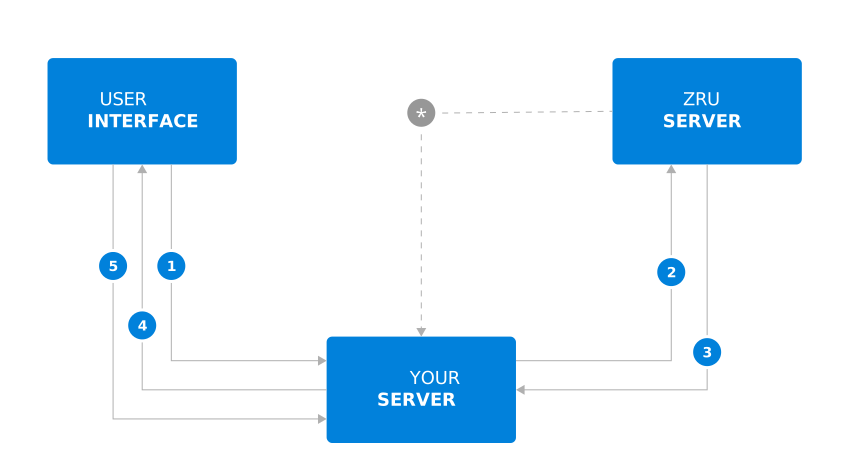
1. The user requests to pay for the order
2. The `payment order` is created through the Zru API (using the `public and private key` obtained from the Zru Panel)
3. The Zru API returns a response, and using the `token` included in the response, you must create the `redirect url` using this format: https://pay.mychoice2pay.com/TOKEN (TOKEN must replaced by the value of `token`).
4. The user is taken to the `redirect url`, which would be the Zru payment screen
5. The user is redirected to a different page, depending on the payment status. In case the payment completed correctly, the user is forwarded to `return_url`, already sent when the payment order was created. In case the user cancels the payment, it will return to the `cancel_url` already sent when the payment order was created
*. Zru will send a notification confirming the payment to the `notification_url` sent when the payment order was created. Likewise, it will send notifications in case of changes related to the payment, or errors, or in case it is a subscription or authorization, it will notify of each payment received.
### iFrame
> It is quite similar to Redirect, the only difference is that the user never leaves your domain because an iframe is used to make the payment.
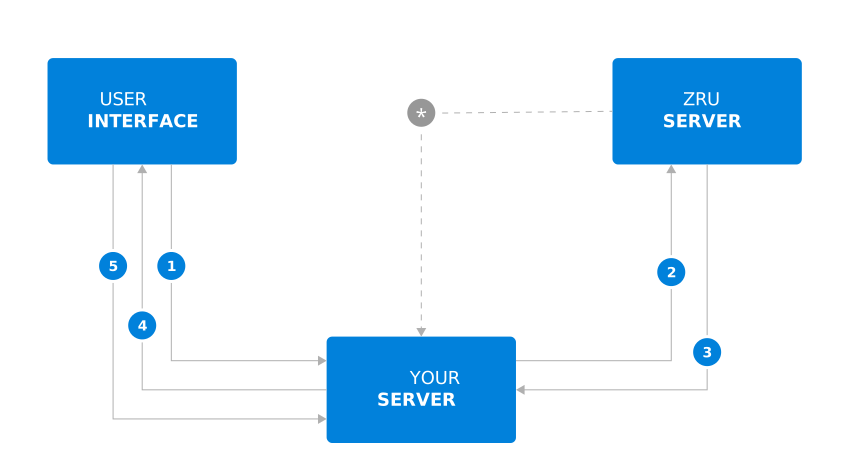
1. The user requests to pay for the order
2. The `payment order` is created through the Zru API (using the `public and private key` obtained from the Zru Panel)
3. The Zru API returns a response, and using the `token` included in the response, you must create the `iframe url` using this format: https://pay.mychoice2pay.com/TOKEN/iframe (TOKEN must replaced by the value of `token`).
4. An iframe is created in the user interface with the `iframe url` with the following parameters: ``
5. The user is redirected to a different page, depending on the payment status. In case the payment completed correctly, the user is forwarded to `return_url`, already sent when the payment order was created. In case the user cancels the payment, it will return to the `cancel_url` already sent when the payment order was created
*. Zru will send a notification confirming the payment to the `notification_url` sent when the payment order was created. Likewise, it will send notifications in case of changes related to the payment, or errors, or in case it is a subscription or authorization, it will notify of each payment received.
### Custom
> This way of integrating Zru allows everything to be done in your domain and you can customize every detail of the user experience when paying.
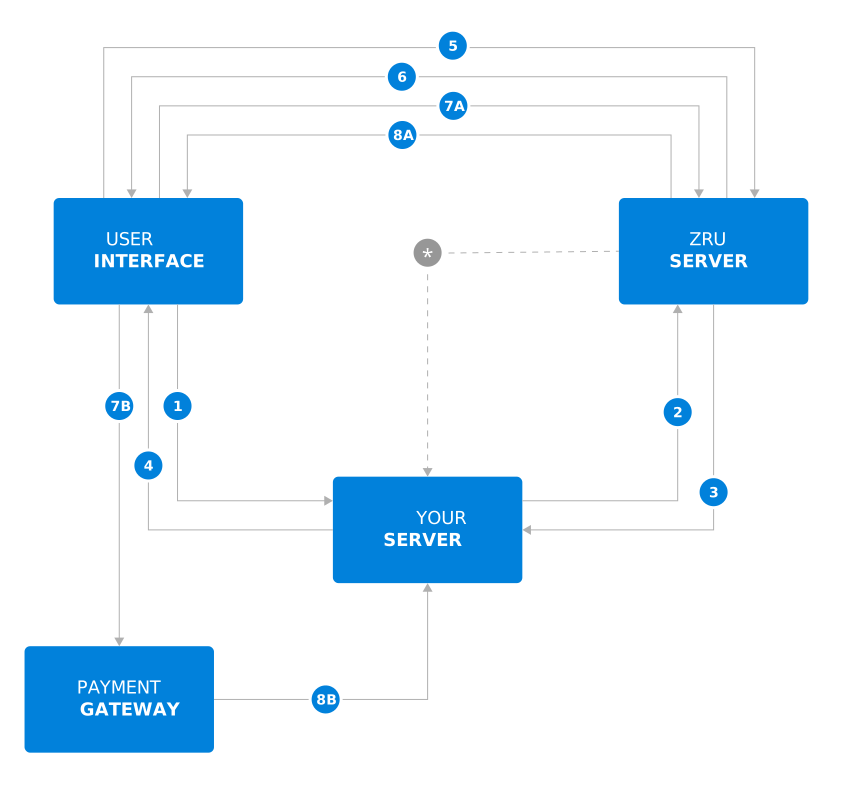
1. The user requests to pay for the order
2. The `payment order` is created through the Zru API (using the `public and private key` obtained from the Zru Panel)
3. The Zru API returns a response, among the data it returns will be the `token` that we will use in the rest of the steps.
4. The `token` is sent to the user interface.
5. The payment methods available for that payment order are requested through the Zru API, using the `token` and the `public key`.
6. The Zru API returns the information about the payment methods and their types.
7. Based on the type of gateway, two things can happen:
- **Card gateways:** the card information will be sent to the Zru API. The API will respond with confirmation of the payment; if affirmative, the payment is completed.
- **Form gateways:** the user must be sent to the url `https://pay.mychoice2pay.com//redirect/`. The user will be redirected to the gateway to finalize the payment and will return to the `return_url` or `cancel_url` accordingly.
*. Zru will send a notification confirming the payment to the `notification_url` sent when the payment order was created. Likewise, it will send notifications in case of changes related to the payment, or errors, or in case it is a subscription or authorization, it will notify of each payment received.